Measure the symptom first
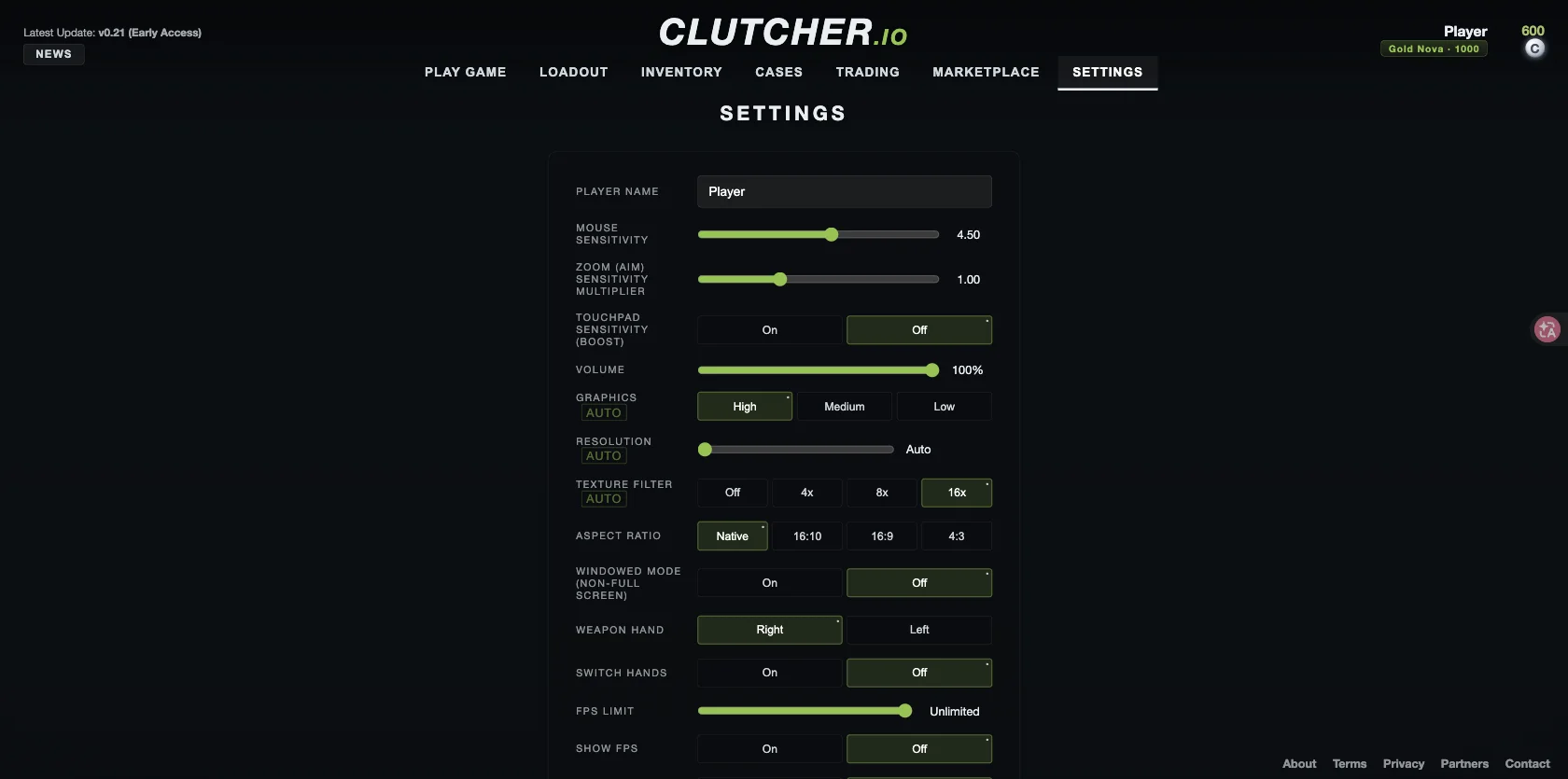
Open Settings and turn Show FPS on. Notice whether the problem is a consistently low frame rate, occasional freezes or a cursor that leaves the game. A mouse-focus problem needs a different check from slow rendering, and changing sensitivity will not tell you why frames are dropping.
For a useful comparison, repeat the same route on the same map with the same bot count. Record your settings and observed behavior before making a change. This is a troubleshooting method, not a published benchmark: we have not measured device-specific FPS gains.
Reduce graphics one step at a time
The verified graphics presets are High, Medium and Low. Try a lower preset and repeat your short comparison. If performance is still poor, inspect the resolution control and test a lower available setting. Reducing resolution can also make distant details harder to see, so judge clarity as well as smoothness.
Texture filtering offers Off, 4x, 8x and 16x. You can compare a lower option, but do not assume that it will solve every slowdown. Keep a change only if it helps your actual session. The menu also includes an FPS limit; compare a sustainable cap with your existing choice if frame pacing is uneven.
Keep the comparison fair
Close unnecessary heavy browser tabs or applications, then retry the same scene. This is a general diagnostic step, not a Clutcher-specific fix. If you change the number of bots, record that change because you are no longer comparing identical conditions.
The Settings panel offers 5, 9 or 13 bots as well as a bots toggle. A smaller practice session is worth comparing if a busy scene performs poorly. We have not verified how much any particular bot count changes CPU or graphics load.
What is known about weaker devices
In the developer’s September 22, 2026 Reddit launch discussion, optimization for low-end Chromebooks was still being worked on. Comments on the game’s TikTok video also include reports of lag and a school PC struggling to run it. These are dated statements and individual reports, not controlled benchmarks or a compatibility list.
If Low graphics still feels unplayable, collect the browser version, device model, map, graphics preset, resolution and approximate FPS you observe. Include whether the problem begins immediately or develops during play. A reproducible report is more useful than an unsupported claim that one browser or one preset is always best. If the game never reaches the menu, use the loading checks instead.
Frequently asked questions
What are the best Clutcher io settings for low-end devices?
There is no verified universal preset. Start by comparing Low graphics using Show FPS, then test resolution and other options one at a time on the same map.
Will changing mouse sensitivity improve FPS?
Sensitivity changes how aiming responds to input. Use the graphics and FPS controls to investigate rendering performance, and treat mouse-focus problems separately.
Sources & verification
Checked on . The game is in early access; menu labels and availability can change.