Explore loadout
Five categories organize the loadout
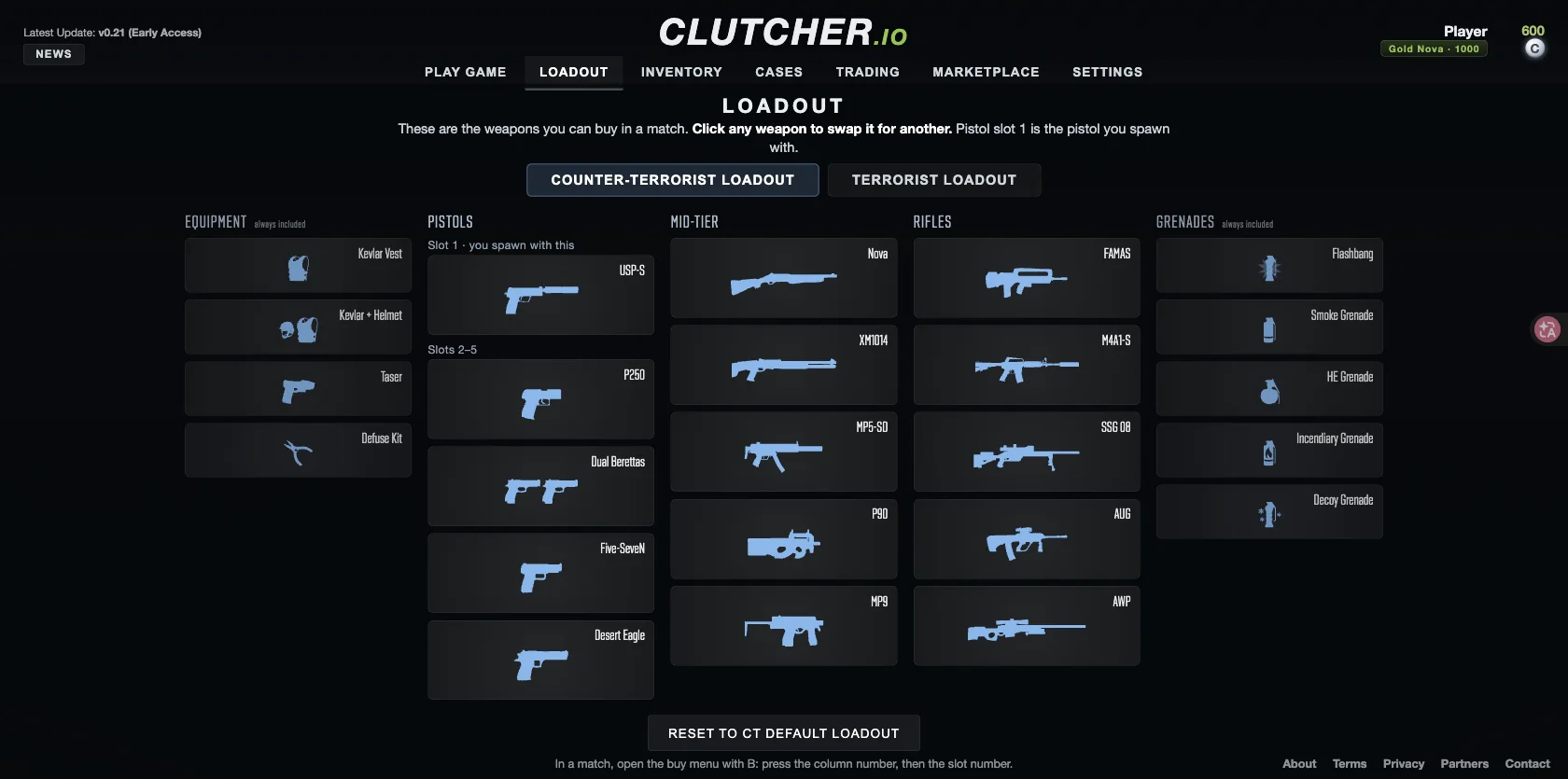
The Loadout screen groups match purchases into Equipment, Pistols, Mid-tier, Rifles and Grenades. The table below records the CT setup visible in the screenshot from our September 28, 2026 check. It is a menu reference, not a weapon-performance ranking.
| Category | Layout | Items in the observed CT setup |
|---|---|---|
| Equipment | Marked always included | Kevlar Vest, Kevlar + Helmet, Taser, Defuse Kit |
| Pistols | Spawn pistol in slot 1; four additional slots | USP-S, P250, Dual Berettas, Five-SeveN, Desert Eagle |
| Mid-tier | Five weapon slots | Nova, XM1014, MP5-SD, P90, MP9 |
| Rifles | Five weapon slots | FAMAS, M4A1-S, SSG 08, AUG, AWP |
| Grenades | Marked always included | Flashbang, Smoke Grenade, HE Grenade, Incendiary Grenade, Decoy Grenade |
CT and T have separate setups
Counter-Terrorist Loadout and Terrorist Loadout are separate tabs. Check the selected side before interpreting the weapons on screen. The CT examples above do not establish the contents of every T slot or the full list of replacement choices.
The pistol column explicitly labels slot 1 as the pistol you spawn with. Slots 2–5 appear beneath it as additional choices. Equipment and Grenades carry the label always included; in this screen that describes their place in the loadout, not a promise that every listed item is free or equipped at spawn.
Prepare a slot, then buy during a round
The Loadout screen prepares which choices can appear for your side; it is not the round buy menu. In Bomb Defuse, the official help says to press B while in your team’s spawn area during the first 44 seconds. Buy with the round-dollar balance, not the C counter in the main menu. The economy overview explains why those displays cannot be added together.
If a weapon is missing when you press B, check three things in order: the CT or T tab you prepared, whether its slot contains that weapon, and whether the current round still allows buying from your location. Then check the price against your dollar balance. The change-weapons guide gives the full replacement steps.
Pre-match loadout check
Use this short check before queueing. It separates a prepared choice from a purchase you can actually make in the round.
- Confirm the CT or T tab before editing a slot.
- Check pistol slot 1 if the spawn pistol matters to your plan.
- Open the in-round buy menu with B only inside spawn and during the buy window.
- Compare the price with round dollars, not the separate C balance.
- If the item is missing, re-check the side and slot before assuming an unlock is broken.
Choose your next task
To replace a weapon, change your spawn pistol or understand the purchase controls, follow the change-weapons guide. It covers the actions separately from this category reference.
For appearance and item questions, use the skins and cases guide. For the balance used to purchase gear in a round, see coins and round money.
If the open question is which rifle to put in a slot, the rifle buying guide compares price, magazine and damage fields by side. For armour, the defuse kit and grenade prices, use equipment and grenades.
Sources & verification
Checked on . The game is in early access; menu labels and availability can change.